
CONNECTING PC
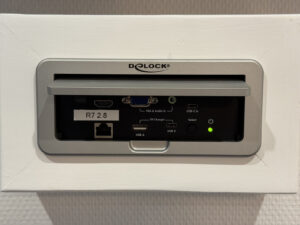
We have multimedia equipment available for displaying a presentation or video via a laptop. You can connect this. We have the following connections available:
- USB-C
- HDMI
- VGA
We assume that you bring your own cable. Don’t have one with you? Then we have cables available. This must be indicated or reserved in advance.
The presentation PC can be connected directly to the internet via a cable (bring your own or reserve one), via an RJ45 connection. Otherwise, you can connect to the Wi-Fi.
HOW DO I CONNECT IT?
Step 1
Open the cabinet (see photo) under the TV.
Step 2
Connect your laptop using one of the connections. Want to use a power outlet? They are located next to it. If you have a modern laptop, you may be able to use the USB-A or USB-C charging function.
Step 3
Turn on the TV. Make sure it is set to HDMI 1 using the remote control. You can start presenting.